
Fictional family. Real software.
The Mbatha family
A plant nursery, a web shop and one Companion Core.
6 Hazelwick Lane, Fernlea
 Interactive 3D tour
- Companion OS, Companion Memory and Companion Agents are in beta.
Meet the family
Thandi grows and sells plants from the greenhouse. Sipho, a backend engineer, builds the small web shop that takes the orders. One Companion Core in the Library keeps the shop’s code, its books and the plant journal.
Thandi
HostAge 44Greenhouse
Grows and sells plants.
Fern is Thandi’s OpenClaw agent. Fills in courier and supplier web forms from Thandi’s notes. Prepares only. Thandi checks each form and sends it herself.
Rented before, on the Core now
Rented before
- GitHub
- Google Home
- Plex
- QuickBooks
On the Core now
 OpenClaw WebCLI
 Gitea
 HortusFox
 Home Assistant
 Jellyfin
 Akaunting
 ntfy
-
Sipho in the library
Thandi’s request becomes an issue
From a club chair, Thandi asks for pot sizes on the plant pages. Sipho types it up as a Gitea issue, so the request sits beside the code.
Watch this momentGiteareplaces GitHub -
Thandi repots the jade plant
Among the birds of paradise, Thandi repots a jade plant and saves its photo and date in HortusFox. The care history lives on the Core.
Watch this momentHortusFox -
The lamps come on before Thandi
On autumn mornings the two pendant lamps switch on just before Thandi opens up. Home Assistant runs the routine from the Core, with no cloud account.
Watch this momentHome Assistantreplaces Google Home -
Fern readies the courier booking
At the console table, Thandi wraps aloes for Monday’s wholesale order. Fern fills in the courier’s booking form, and Thandi checks the slot and sends it herself.
OpenClaw WebCLIScripted Fern: “Here is the booking, filled in. Please check the slot first.”
OpenClaw reaches websites over your home internet.
Watch this moment -
The living room
The time-lapse plays again
The time-lapse of the greenhouse going up plays on the TV, and Thandi and Sipho watch it together. Jellyfin plays their own video files from the Core.
Watch this momentJellyfinreplaces Plex -
The dining table
Thandi raises a garden centre invoice
After Saturday’s market, Thandi raises the garden centre’s invoice in Akaunting. Takings, invoices and customers share one set of books at home, on the Core.
Akauntingreplaces QuickBooksCompanion OS is in beta.
Watch this moment -
The kitchen
A new order pings Thandi’s phone
While a pot simmers, Thandi’s phone buzzes once. A script Sipho runs posts each new web order to ntfy on the Core, which sends the push notification.
Watch this momentntfy -
Out in the garden
Thandi cuts back the lavender
Beside the lap pool, Thandi cuts back the lavender. She adds a note to its HortusFox page about how hard she cut, so next autumn the note is there.
Watch this momentHortusFox
Real screenshots of Thandi’s apps
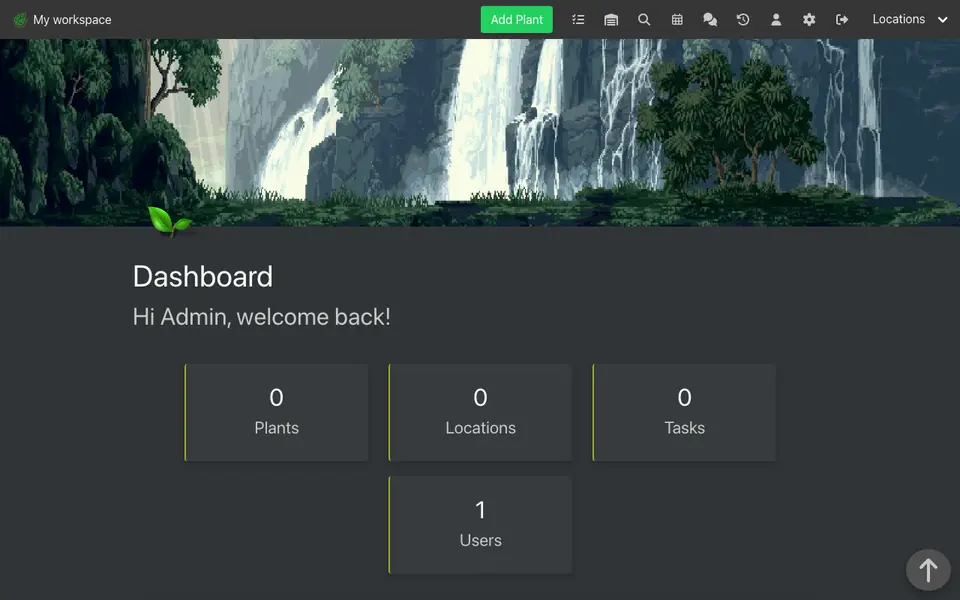
Real screenshot of HortusFox from a Companion Hub QA run. Not a recording of this family. 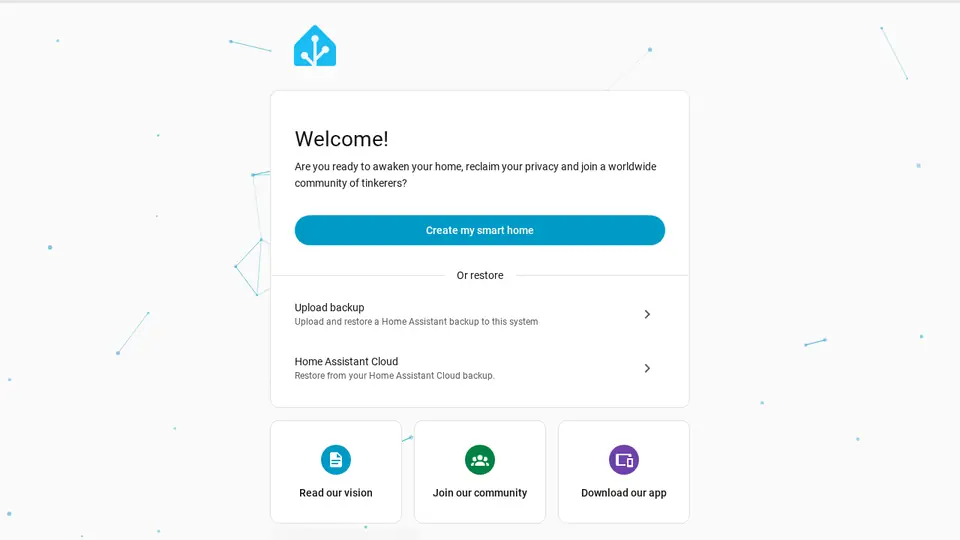
Real screenshot of Home Assistant from a Companion Hub QA run. Not a recording of this family.
Sipho
BuilderAge 46Library
Backend engineer.
Acorn is Sipho’s OpenClaw agent. Opens courier tracking pages and lists the late parcels for Sipho. Lists only. Sipho reads each list and writes any email himself.
Rented before, on the Core now
Rented before
- GitHub
- Salesforce
- Google Photos
On the Core now
- Gitea
- OpenClaw WebCLI
 Twenty
 Yuvomi
 Immich
 Open WebUI
-
Sipho pushes the postcode fix
A buyer’s postcode keeps failing, so Sipho pushes a fix to Gitea. The code and its history sit on the Core, not on a rented code host.
Giteareplaces GitHubCompanion OS is in beta.
Watch this moment -
Acorn finds the late parcels
Before packing starts, Sipho asks Acorn to open the courier’s tracking pages. Acorn lists the late parcels, and Sipho decides who gets an email.
OpenClaw WebCLIScripted Acorn: “Here are the late parcels. Please read the list before you write.”
OpenClaw reaches websites over your home internet.
Watch this moment -
Sipho copies each buyer into Twenty
When a new order lands, Sipho’s script adds the buyer to Twenty. Thandi finds an address there before a delivery, and the customer list is hosted at home.
Watch this momentTwentyreplaces Salesforce -
Thandi in the greenhouse
Sipho logs Thandi’s promise
Soil on her hands, Thandi tells Sipho what to promise a garden centre. He adds it to the garden centre’s row in Twenty, beside last spring’s order on the Core.
Watch this momentTwentyreplaces Salesforce -
The living room
Thandi and Sipho split market jobs
On the sectional, Thandi and Sipho split Saturday’s market jobs. Crates and labels go to Thandi, the stall table to Sipho, and Yuvomi keeps one task board.
Watch this momentYuvomi -
The dining table
Sipho picks the lead pictures
At the dining table, Sipho picks a lead picture for each plant page. Thandi’s plant photos back up to Immich, so the originals stay in a library at home.
Watch this momentImmichreplaces Google Photos -
The kitchen
Thursday’s lunch starts with chives
Chives from the greenhouse sit on the breakfast bar, and Sipho plans Thursday’s lunch around them in Yuvomi. He adds the rest to the shared list on the Core.
Watch this momentYuvomi -
Out in the garden
Sipho asks a model about stock
On the loungers, Sipho chases a drifting stock count in a JupyterLab notebook. He asks a model on the Core through Open WebUI, and the question stays there by default.
Watch this momentOpen WebUI
Real screenshots of Sipho’s apps

Real screenshot of Immich from a Companion Hub QA run. Not a recording of this family.
The home
- 2 storeys
- 272 m²
- 16 rooms
Scroll the plan sideways to see all of it.
Scroll the plan sideways to see all of it.
A diagram of the rooms, drawn from the home’s layout. It leaves out walls, doors and stairs. The pins show the room each person uses, and the small box marks the Companion Core.
What runs on the Core
One Companion Core in the house runs these apps. Each is in the Companion Hub store. Other software is named in text, for what it replaces.
- OpenClaw WebCLIFrom the OpenClaw Foundation
- GiteaReplaces GitHub
- TwentyReplaces Salesforce
- HortusFox
- Home AssistantReplaces Google Home
- Yuvomi
- JellyfinReplaces Plex
- AkauntingReplaces QuickBooks
- ImmichReplaces Google Photos
- ntfy
- Open WebUI
The other apps in these stories are made by other people, most of them open-source projects. Companion Intelligence did not make them. A logo belongs to its project. It shows which app is named beside it.
How it runs
Two pieces do the work. One runs on the Core. The other keeps track of your devices.
Companion Hub
Companion Hub is where you install apps on the Core. Pick one in the Companion Hub store and Hub sets it up. Installing apps uses the internet.
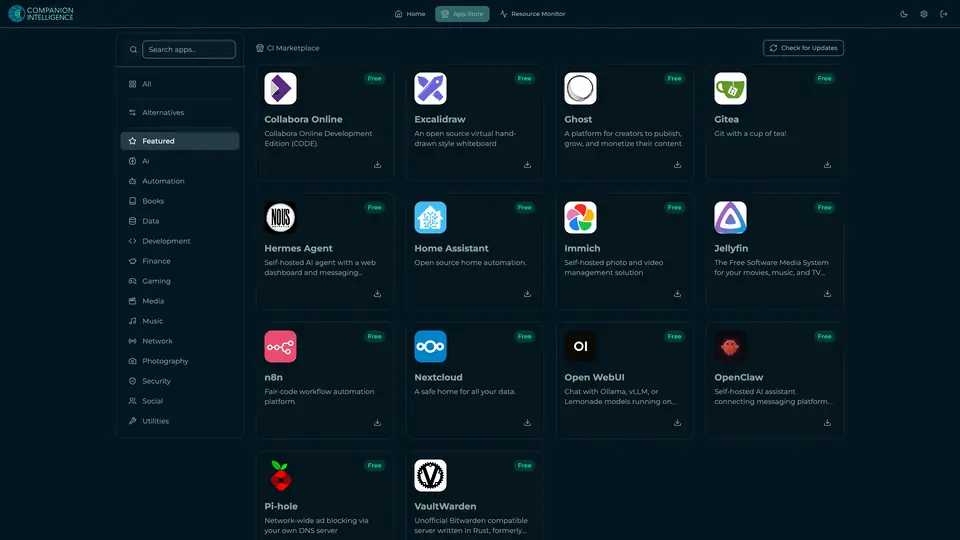
Real screenshot of Companion Hub from a product tutorial capture. Not a recording of this family. 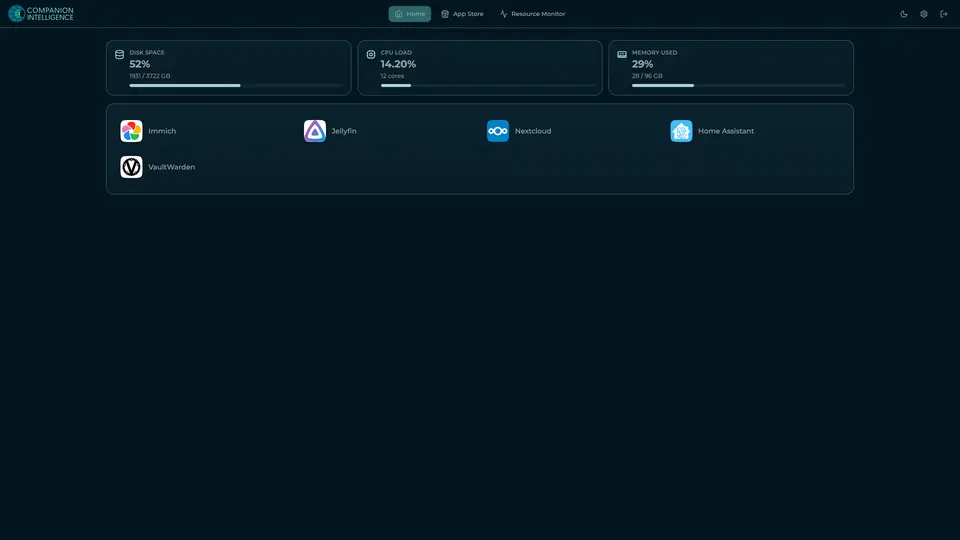
Real screenshot of Companion Hub from a product tutorial capture, with sample data. The disk, CPU and memory figures are the capture machine's, not a Companion Core spec. Not a recording of this family.
Companion account
Your Companion account pairs your devices with the Hub and lists them. The apps and their files stay on the Core.

Real screenshot of the Companion account page from a product tutorial capture, with sample data. Not a recording of this family. 
Real screenshot of the Companion account page from a product tutorial capture, with sample data. Not a recording of this family.
How the Core starts
-
Plug it in.
The parcel holds the Companion Core, a power cable, a quick-start guide and a recovery USB drive. Companion OS is already on its drive. Plug it in and press the button.
-
Join its Wi-Fi.
The Core opens its own Wi-Fi network. Join it from a phone, choose your home network from the list and enter its password.
-
Pick your apps and run.
In the Companion Hub store, pick your first agents and apps. Then walk away. Installing apps uses the internet.
Some steps use the internet: installing apps from the Companion Hub store, and any website or messaging service your agent talks to.
UnCloud your life.
Your customer list, invoices and plant notes can live on a Companion Core at home. Browse the Companion Hub store and pick your first apps.