
Fictional family. Real software.
The Gill family
A retired couple, one Companion Core, and a table that fills most weekends.
4 Kingfisher Reach, Stonebeck
 Interactive 3D tour
- Companion OS, Companion Memory and Companion Agents are in beta.
Meet the family
Harpreet, a retired electrician, cooks for friends most weekends. Jaswinder, a retired pharmacist, keeps the papers, plans and trips in order from the Reading Lounge. One Companion Core serves them both.
Harpreet
HostAge 61Kitchen
Retired electrician who hosts and cooks.
Cardamom is Harpreet’s Hermes agent. Drafts Harpreet’s group messages to friends from the notes he types. Drafts only. Harpreet reads and sends every message himself.
Rented before, on the Core now
Rented before
- Plex
- iCloud
- Google Home
- Google Photos
On the Core now
 Jellyfin
 Nextcloud
 Home Assistant
 KitchenOwl
 Hermes
 HortusFox
 Immich
-
The spring parade plays again
A visiting friend missed the spring parade, so Harpreet plays his own video. Jellyfin serves it from the Core to the tablet in his hand.
Watch this momentJellyfinreplaces Plex -
Harpreet looks up three addresses
Cards for three autumn anniversaries need addresses. At the coffee table, Harpreet looks them up in the shared Nextcloud contacts Jaswinder keeps. The Core serves them to his phone.
Watch this momentNextcloudreplaces iCloud -
A lamp warms before she reads
Jaswinder reads at nine each morning. Harpreet sets a Home Assistant rule on the Core, so the floor lamp’s Wi-Fi bulb comes on before she sits.
Watch this momentHome Assistantreplaces Google Home -
Harpreet’s kitchen
Eight for lunch needs one list
Eight friends are coming on Sunday. KitchenOwl on the Core holds the list: Harpreet writes it at the breakfast bar, and Jaswinder adds mint.
Watch this momentKitchenOwl -
Harpreet’s kitchen
The dal he never wrote down
Harpreet has cooked his dal by feel for decades. At the counter he measures each spice and types the steps into the KitchenOwl recipe book. Now Jaswinder can cook it.
Watch this momentKitchenOwl -
Harpreet’s kitchen
Cardamom drafts while the pot simmers
Between stirs, Harpreet types Cardamom a note on who is bringing what. Cardamom drafts the group message on the Core’s local model, and Harpreet reads it and sends it himself.
HermesScripted Cardamom: “The message is ready. Read it first, then send it yourself.”
Messages pass through the chat service you choose.
Watch this moment -
Out by the water
Harpreet writes down the watering
Tuesday morning, Harpreet waters the planters. In the HortusFox journal on the Core, he adds the date and a photo.
Watch this momentHortusFox -
Upstairs, the primary suite
The wedding album goes in once
The wedding album is coming apart at the spine, so Harpreet scans its pages into Immich. The scans sit on the Core, where he can search them.
Immichreplaces Google PhotosThe first start takes a while.
Watch this moment
Real screenshots of Harpreet’s apps
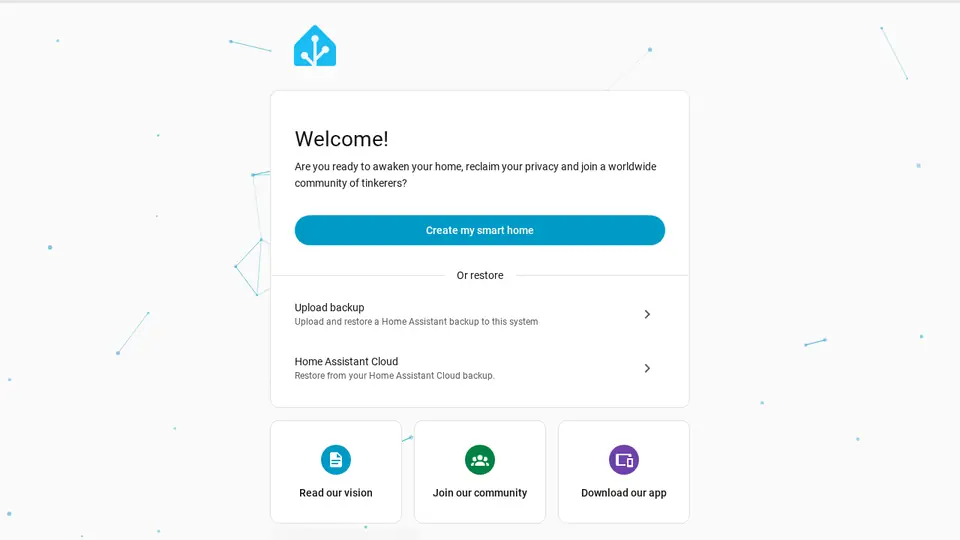
Real screenshot of Home Assistant from a Companion Hub QA run. Not a recording of this family. 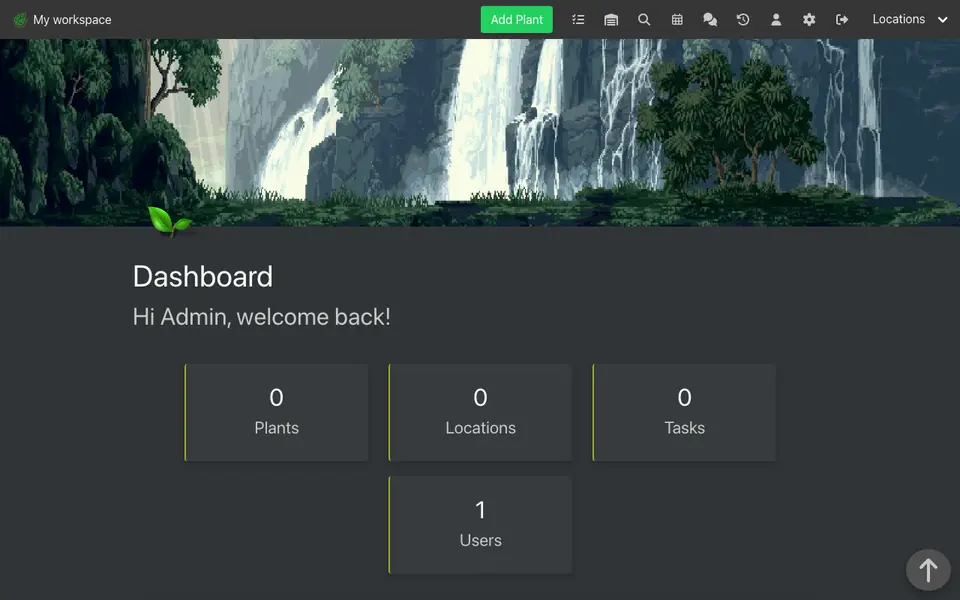
Real screenshot of HortusFox from a Companion Hub QA run. Not a recording of this family. 
Real screenshot of Immich from a Companion Hub QA run. Not a recording of this family.
Jaswinder
OrganiserAge 63Reading lounge
Retired pharmacist.
Cumin is Jaswinder’s Hermes agent. Drafts replies to Jaswinder’s letters and emails from the points she gives. Drafts only. Jaswinder reads every word and sends it herself.
Rented before, on the Core now
Rented before
- Evernote
- LastPass
- Mint
- Audible
- Flighty
On the Core now
- Hermes
 Paperless-ngx
 VaultWarden
 Companion Planning
 Firefly III
 Yuvomi
 Audiobookshelf
 AirTrail
-
Jaswinder scans the certificate
Jaswinder takes Harpreet’s apprenticeship certificate off the shelf and scans it. Paperless-ngx reads and tags the scan on the Core, so she finds it later by a word on it.
Watch this momentPaperless-ngxreplaces Evernote -
Jaswinder answers the council
The council’s river path letter needs an answer. Jaswinder gives Cumin three points, and Cumin drafts it on the Core’s local model. Jaswinder reads it, then sends it herself.
HermesScripted Cumin: “The draft is ready. Please read every line before you send it.”
Messages pass through the chat service you choose.
Watch this moment -
One sign-in reaches both phones
Jaswinder saves the plumber’s sign-in in VaultWarden. Harpreet finds it on his phone through the Bitwarden apps. The vault runs on the Core.
Watch this momentVaultWardenreplaces LastPass -
Jaswinder blocks out her week
Morning light fills the Garden Room while Jaswinder sets time aside for each of the week’s tasks in Companion Planning. The plan is one local file on the Core.
Watch this momentCompanion Planning -
The dining hall
The water bill finds its line
On the first of the month, bills cover the oval table. Jaswinder types the water bill into Firefly III on the Core, and a rule sorts it.
Watch this momentFirefly IIIreplaces Mint -
Harpreet’s kitchen
Jaswinder clears the fridge door
Jaswinder retires three paper calendars from the fridge door. One Yuvomi calendar now holds the window cleaner and the weekend guests, in a database on the Core.
Watch this momentYuvomi -
Out by the water
Harpreet peels while she listens
On the cabana sofa, Jaswinder follows the book club novel while Harpreet peels garlic beside her. Audiobookshelf, running on the Core, remembers her place.
Watch this momentAudiobookshelfreplaces Audible -
Upstairs, the primary suite
Jaswinder logs flights to her sister
At the Dressing Room vanity, Jaswinder logs last year’s flights to her sister. Each one joins the travel history AirTrail keeps on the Core.
Watch this momentAirTrailreplaces Flighty
Real screenshots of Jaswinder’s apps
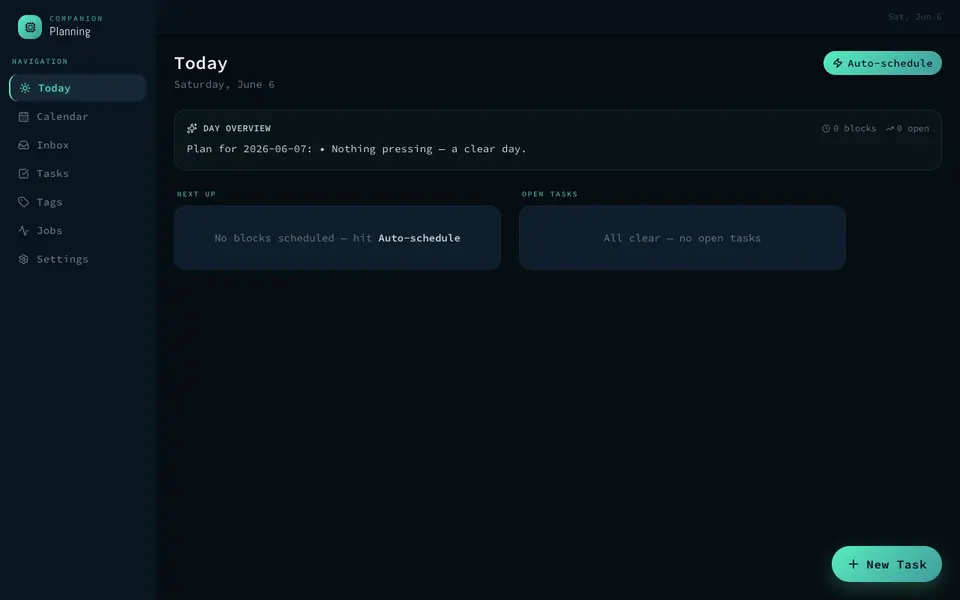
Real screenshot of Companion Planning from a Companion Hub QA run. Not a recording of this family.
The home
- 2 storeys
- 215 m²
- 17 rooms
Scroll the plan sideways to see all of it.
Scroll the plan sideways to see all of it.
A diagram of the rooms, drawn from the home’s layout. It leaves out walls, doors and stairs. The pins show the room each person uses, and the small box marks the Companion Core.
What runs on the Core
One Companion Core in the house runs these apps. Each is in the Companion Hub store. Other software is named in text, for what it replaces.
- HermesFrom Nous Research
- JellyfinReplaces Plex
- NextcloudReplaces iCloud
- Paperless-ngxReplaces Evernote
- Home AssistantReplaces Google Home
- VaultWardenReplaces LastPass
- Companion PlanningFirst party
- Firefly IIIReplaces Mint
- KitchenOwl
- Yuvomi
- HortusFox
- AudiobookshelfReplaces Audible
- AirTrailReplaces Flighty
- ImmichReplaces Google Photos
The other apps in these stories are made by other people, most of them open-source projects. Companion Intelligence did not make them. A logo belongs to its project. It shows which app is named beside it.
How it runs
Two pieces do the work. One runs on the Core. The other keeps track of your devices.
Companion Hub
Companion Hub is where you install apps on the Core. Pick one in the Companion Hub store and Hub sets it up. Installing apps uses the internet.
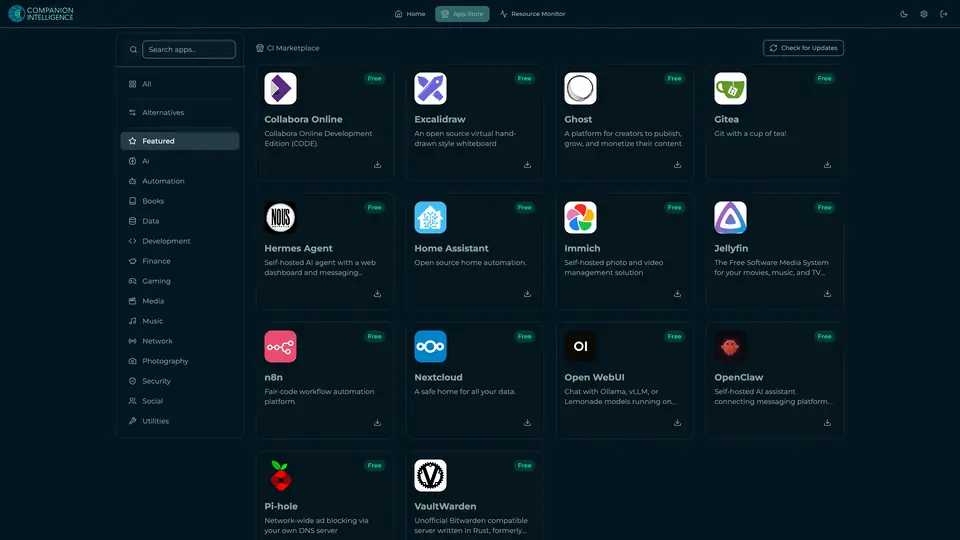
Real screenshot of Companion Hub from a product tutorial capture. Not a recording of this family. 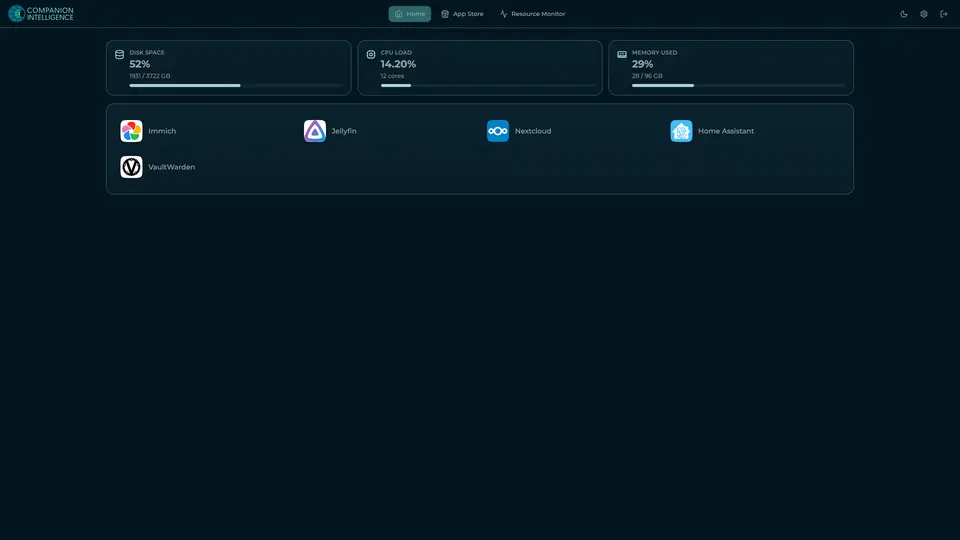
Real screenshot of Companion Hub from a product tutorial capture, with sample data. The disk, CPU and memory figures are the capture machine's, not a Companion Core spec. Not a recording of this family.
Companion account
Your Companion account pairs your devices with the Hub and lists them. The apps and their files stay on the Core.

Real screenshot of the Companion account page from a product tutorial capture, with sample data. Not a recording of this family. 
Real screenshot of the Companion account page from a product tutorial capture, with sample data. Not a recording of this family.
How the Core starts
-
Plug it in.
The parcel holds the Companion Core, a power cable, a quick-start guide and a recovery USB drive. Companion OS is already on its drive. Plug it in and press the button.
-
Join its Wi-Fi.
The Core opens its own Wi-Fi network. Join it from a phone, choose your home network from the list and enter its password.
-
Pick your apps and run.
In the Companion Hub store, pick your first agents and apps. Then walk away. Installing apps uses the internet.
Some steps use the internet: installing apps from the Companion Hub store, and any website or messaging service your agent talks to.
UnCloud your life.
Your albums, bills and recipes can live on a Companion Core at home. Browse the Companion Hub store and pick your first apps.