
Fictional family. Real software.
The Jankowski family
A bookkeeper, a device consultant and one Companion Core by the sea.
4 Cuttlebone Walk, Oakenholt
 Interactive 3D tour
- Companion OS, Companion Memory and Companion Agents are in beta.
Meet the family
Agnieszka runs a bookkeeping and HR service from the writing desk upstairs. Tomasz, an IoT consultant, works at the octagonal table in the sunroom. One Companion Core on a shelf there serves both businesses.
Agnieszka
OrganiserAge 42Bedroom 2
Runs a bookkeeping and HR service.
Truffle is Agnieszka’s OpenClaw agent. Opens Twenty in its own browser and moves the deals Agnieszka names. Prepares entries only. Agnieszka checks every field before it stands.
Rented before, on the Core now
Rented before
- Amazon Kindle
- OurHome
- Cozi
- DocuSign
- Google Drive
- Salesforce
- QuickBooks
- Microsoft Office
On the Core now
 OpenClaw WebCLI
 Koodo Reader
 HomeHub
 Docuseal
 Nextcloud
 Twenty
 Akaunting
 LibreOffice
-
The sunroom lounge
Agnieszka picks up where she stopped
After lunch, Agnieszka stretches along the sectional with a thick biography from the family’s ebook library. Koodo Reader keeps her place and her margin notes on the Core.
Watch this momentKoodo Readerreplaces Amazon Kindle -
The kitchen
Agnieszka gives Tomasz the deck oiling
The deck needs oil before the weather turns. Agnieszka adds it to the HomeHub chore board and gives it to Tomasz. The board is served from the Core.
Watch this momentHomeHubreplaces OurHome -
The kitchen
The oldest mackerel goes first
A neighbour’s boat lands more mackerel than the street can eat. Agnieszka dates the spare bags in HomeHub’s expiry tracker on the Core, so the oldest gets cooked first.
Watch this momentHomeHubreplaces Cozi -
The dining room
A client signs at the table
The boatyard’s owner comes by on Wednesday morning. She signs the engagement letter on her phone, over the home Wi-Fi, with Docuseal on the Core. Agnieszka pours the tea.
Watch this momentDocusealreplaces DocuSign -
The payroll run finds its folder
A client’s payroll run lists her staff’s wages. Agnieszka files it in Nextcloud, on the Core, not in a rented drive.
Watch this momentNextcloudreplaces Google Drive -
Truffle moves the boatyard along
The boatyard has signed. Agnieszka asks Truffle to move the deal along, and Truffle opens Twenty on the Core. Agnieszka checks the new stage herself before the deal moves on.
Twentyreplaces SalesforceScripted Truffle: “The stage is ready. Please check it before it moves on.”
Watch this moment -
The boatyard gets its first invoice
This week the boatyard’s first invoice goes out. Agnieszka raises it in Akaunting on the Core, beside her other clients’ invoices and expenses.
Watch this momentAkauntingreplaces QuickBooks -
A new client’s handbook takes shape
A new client wants a staff handbook before the month ends. Agnieszka drafts it in LibreOffice, which runs on the Core and shows in her browser.
Watch this momentLibreOfficereplaces Microsoft Office
Real screenshots of Agnieszka’s apps
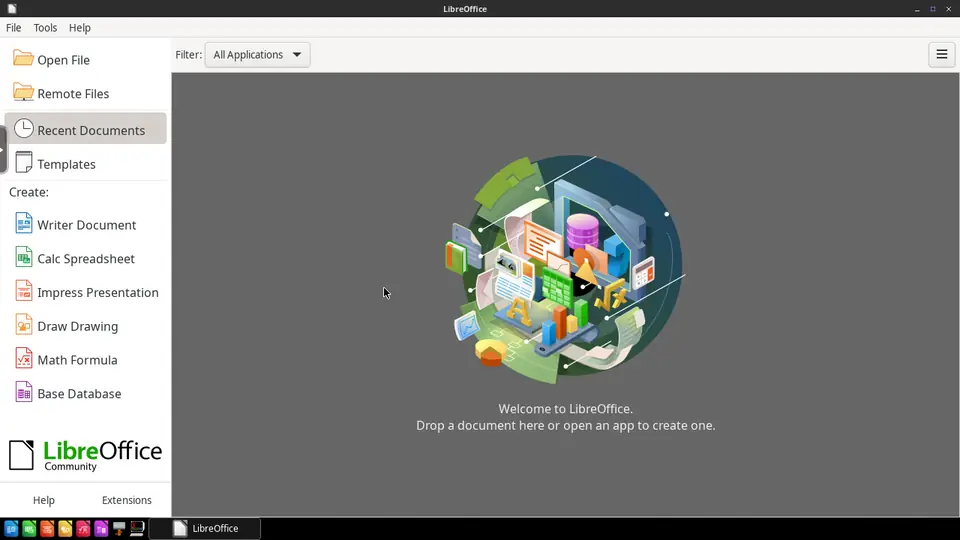
Real screenshot of LibreOffice from a Companion Hub QA run. Not a recording of this family.
Tomasz
BuilderAge 44Sunroom lounge
IoT consultant.
Gadget is Tomasz’s Hermes agent. Drafts the handover notes Tomasz sends to clients after an install. Drafts only. Tomasz reads every note and sends it himself.
Rented before, on the Core now
Rented before
- GitHub
- Google Home
- YNAB
- Zapier
- Spotify
- Ring
On the Core now
 Forgejo
 Open WebUI
 Hermes
 Home Assistant
 monetr
 Activepieces
 Navidrome
 Frigate
-
A client’s settings get a branch
Before a client’s install, Tomasz saves her sensor settings as a branch, so any change can be undone. Forgejo keeps that history on the Core.
Watch this momentForgejoreplaces GitHub -
The gappy log gets a question
A client’s sensor log is full of gaps. Tomasz sorts it in JupyterLab, then asks a model through Open WebUI. The question stays on the Core by default.
Watch this momentOpen WebUI -
Gadget drafts, and Tomasz sends
After an install, Tomasz messages Gadget his notes. Gadget drafts the handover on the Core’s local model, and Tomasz reads it and sends it himself.
HermesScripted Gadget: “Here is the handover note. Please read it before you send it.”
Messages pass through the chat service you choose.
Watch this moment -
The kitchen
Tomasz measures the warm sunroom
The sunroom runs warm, so Tomasz puts a Wi-Fi sensor there and one in the kitchen. Home Assistant compares both readings on the Core and itself needs no cloud account.
Watch this momentHome Assistantreplaces Google Home -
The dining room
Money set aside for the van
The van’s service and the software renewals land in one month. At the dining table Tomasz sets money aside in monetr, which keeps the budget on the Core.
Watch this momentmonetrreplaces YNAB -
Agnieszka at her desk
A report lands where Agnieszka looks
Each Friday morning, an Activepieces flow Tomasz built gathers the clients’ device reports for Agnieszka. It runs on the Core, and she finds them ready when she bills.
Watch this momentActivepiecesreplaces Zapier -
Deck and drive
Tomasz finds the album from breakfast
After a client call, Tomasz takes his phone to the deck bench and searches for the album Agnieszka mentioned. Navidrome serves it from the Core over the home Wi-Fi.
Watch this momentNavidromereplaces Spotify -
Deck and drive
Tomasz draws the drive’s edge
Passing cars on the lane keep starting clips, so Tomasz draws a zone around his own drive in Frigate. The clips stay on the Core.
Watch this momentFrigatereplaces Ring
Real screenshots of Tomasz’s apps
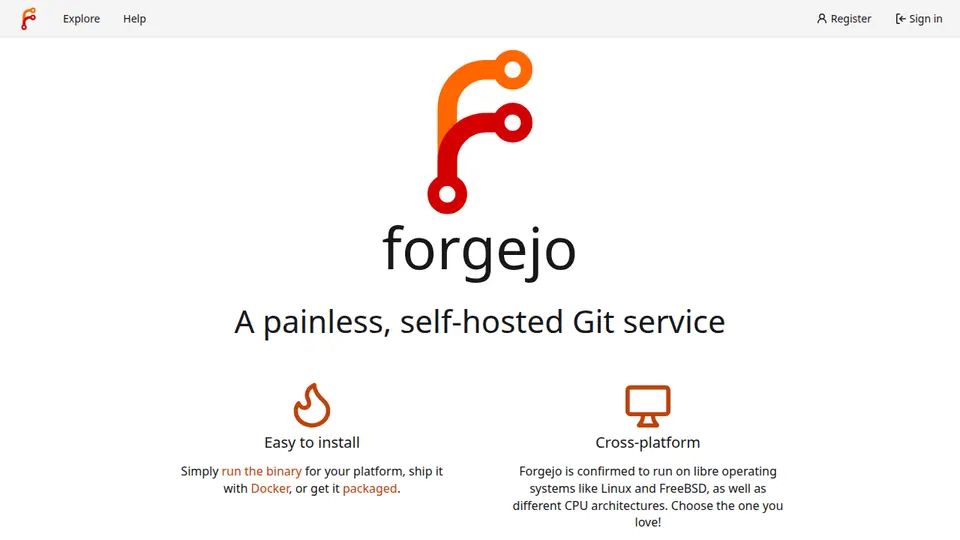
Real screenshot of Forgejo from a Companion Hub QA run. Not a recording of this family. 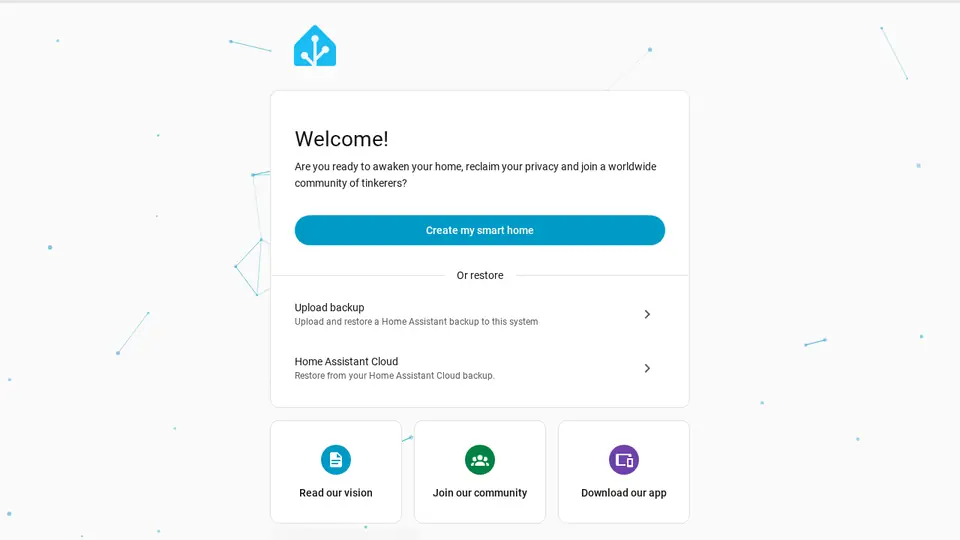
Real screenshot of Home Assistant from a Companion Hub QA run. Not a recording of this family.
The home
- 3 storeys
- 311 m²
- 11 rooms
Scroll the plan sideways to see all of it.
Scroll the plan sideways to see all of it.
Scroll the plan sideways to see all of it.
A diagram of the rooms, drawn from the home’s layout. It leaves out walls, doors and stairs. The pins show the room each person uses, and the small box marks the Companion Core.
What runs on the Core
One Companion Core in the house runs these apps. Each is in the Companion Hub store. Other software is named in text, for what it replaces.
- OpenClaw WebCLIFrom the OpenClaw Foundation
- Koodo ReaderReplaces Amazon Kindle
- ForgejoReplaces GitHub
- Open WebUI
- HermesFrom Nous Research
- HomeHubReplaces OurHome
- Home AssistantReplaces Google Home
- DocusealReplaces DocuSign
- monetrReplaces YNAB
- NextcloudReplaces Google Drive
- TwentyReplaces Salesforce
- ActivepiecesReplaces Zapier
- AkauntingReplaces QuickBooks
- LibreOfficeReplaces Microsoft Office
- NavidromeReplaces Spotify
- FrigateReplaces Ring
The other apps in these stories are made by other people, most of them open-source projects. Companion Intelligence did not make them. A logo belongs to its project. It shows which app is named beside it.
How it runs
Two pieces do the work. One runs on the Core. The other keeps track of your devices.
Companion Hub
Companion Hub is where you install apps on the Core. Pick one in the Companion Hub store and Hub sets it up. Installing apps uses the internet.
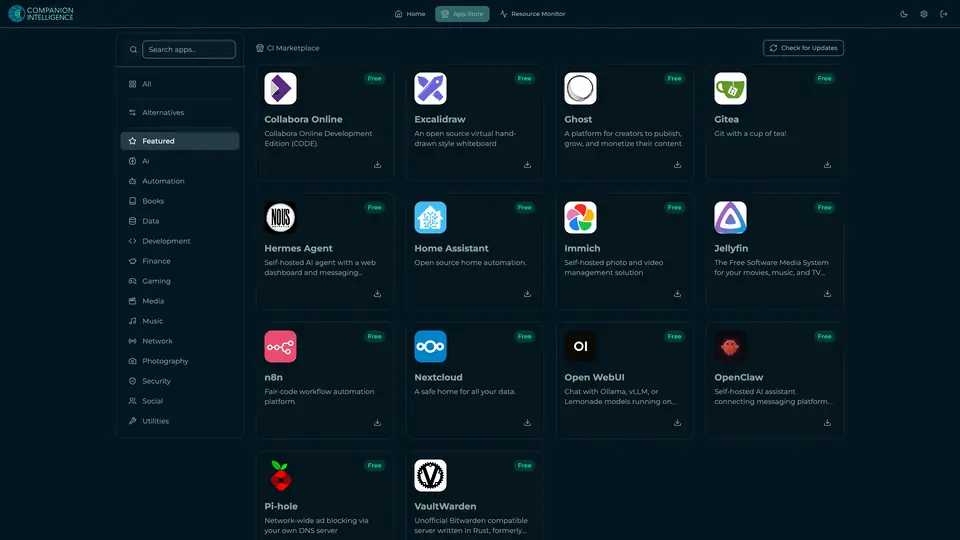
Real screenshot of Companion Hub from a product tutorial capture. Not a recording of this family. 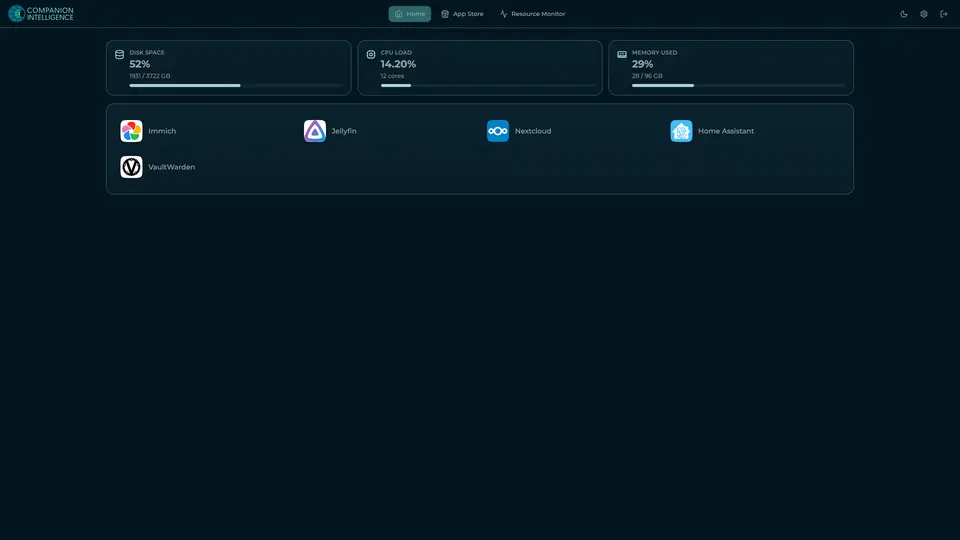
Real screenshot of Companion Hub from a product tutorial capture, with sample data. The disk, CPU and memory figures are the capture machine's, not a Companion Core spec. Not a recording of this family.
Companion account
Your Companion account pairs your devices with the Hub and lists them. The apps and their files stay on the Core.
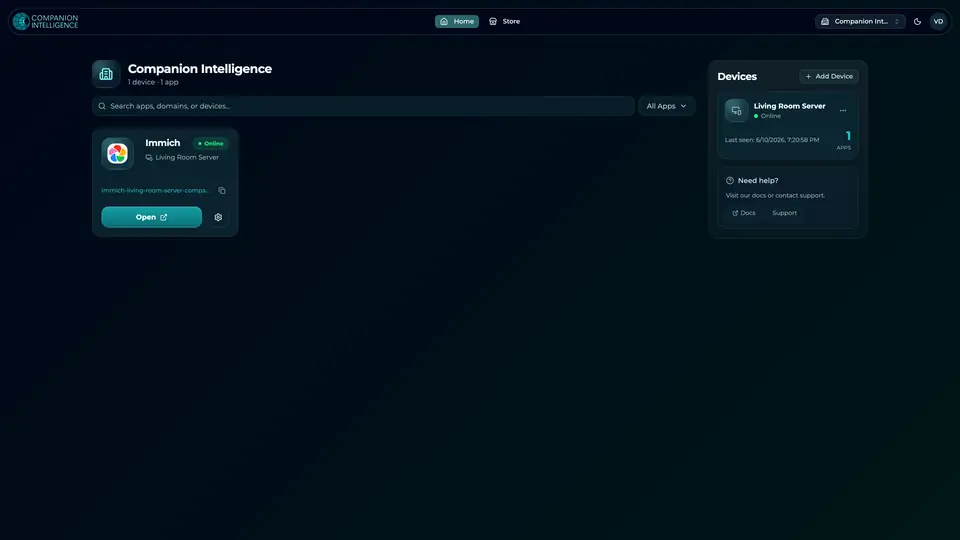
Real screenshot of the Companion account page from a product tutorial capture, with sample data. Not a recording of this family. 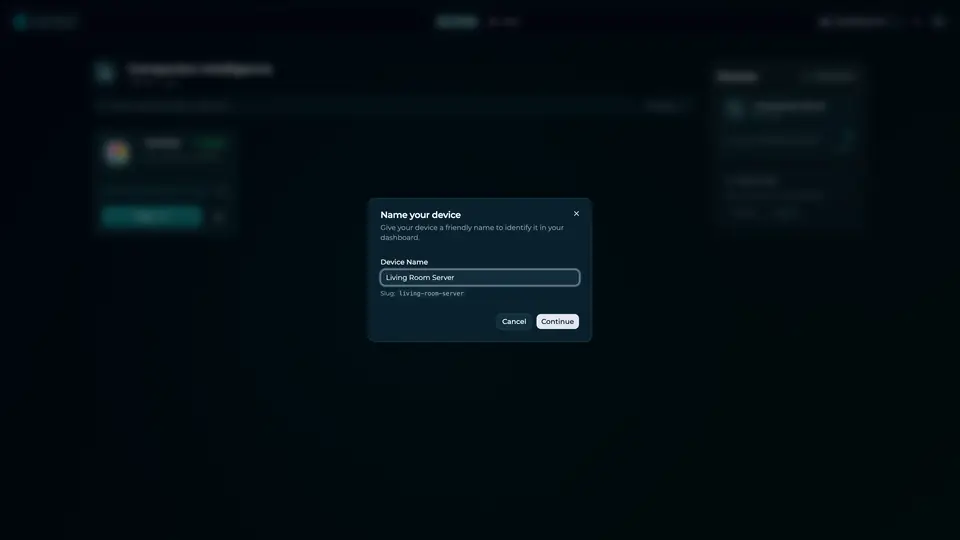
Real screenshot of the Companion account page from a product tutorial capture, with sample data. Not a recording of this family.
How the Core starts
-
Plug it in.
The parcel holds the Companion Core, a power cable, a quick-start guide and a recovery USB drive. Companion OS is already on its drive. Plug it in and press the button.
-
Join its Wi-Fi.
The Core opens its own Wi-Fi network. Join it from a phone, choose your home network from the list and enter its password.
-
Pick your apps and run.
In the Companion Hub store, pick your first agents and apps. Then walk away. Installing apps uses the internet.
Some steps use the internet: installing apps from the Companion Hub store, and any website or messaging service your agent talks to.
UnCloud your life.
Your client files, invoices and device settings can sit on a Companion Core at home. Browse the Companion Hub store and pick your first apps.